
If you’ve ever ran into the need to make the Post Title on a CPT be completely managed by your Code and non-editable by the User, here’s a solution. This will require some additional setup on your Pod.
- You have to go into the Advanced Options for your Pod and unselect the ‘Post Title’ option in the ‘Supports’ list.
- Then, you’ll need to add a field at the Top of your Pod called ‘Title’ and set the actual field name to ‘label’ and make it read-only in the UI.
The following scripts can go in your functions.php or a in a plugin specifically for your project.
<?php
/* Plugin Name: GNT */
/**
* This filter fills in the post name for our custom post type
*/
add_filter( 'wp_insert_post_data' , 'gnt_modify_post_title' , '99', 2 );
function gnt_modify_post_title($data) {
//only run for our post type
if ($data['post_type'] == 'accel_feedback') {
//make a simple date
$date = date('d-M-Y', strtotime($data['post_date']));
//get user full name or login name
$user_info = get_userdata($data['post_author']);
$user_full_name = trim($user_info->first_name ." ". $user_info->last_name);
if (empty($user_full_name)) {
$user_full_name = $user_info->user_login;
}
//create a post title
$data['post_title'] = "$user_full_name - $date";
}
return $data;
}
/**
* This filter updates our read-only pod field to match the real WP title
*/
add_action('pods_api_post_save_pod_item_accel_feedback', 'gnt_post_save_accel_feedback', 10, 3);
function gnt_post_save_accel_feedback($pieces, $is_new_item, $id) {
//unhook action to avoid infinite loop! :)
remove_action('pods_api_post_save_pod_item_accel_feedback', 'gnt_post_save_accel_feedback');
//get the pod and set our read-only 'label' to match the post title
$pod = pods('accel_feedback', $id);
$pod->save('label', get_the_title($id));
//reinstate the action
add_action('pods_api_post_save_pod_item_accel_feedback', 'gnt_post_save_accel_feedback');
}
After setting up the Pod, here’s an example of what the final back-end form looks like:
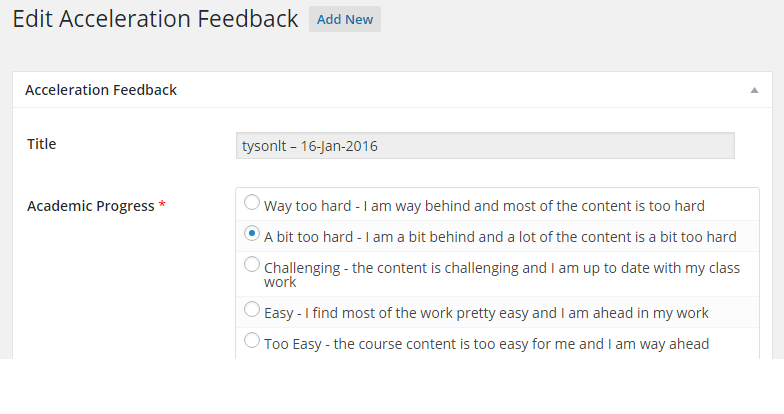
If you’re wondering how the ‘More Fields’ was changed, check out the documentation on How to Update the Meta Box Title for your Pods.
Contributor: tysonIt on Slack